 Otto
OttoFollow Up Templates and an AI Workflow for Busy Professionals
Follow Up Templates and an AI Workflow for Busy Professionals

The best follow-up is short: three to six sentences that reference the original conversation, add one new piece of value, and close with a single yes/no or time-based ask. Use a reply-in-thread, value-add template for anything active, and switch to a final-touch close after two or three unanswered attempts. Keep it brief, and make replying take one click, not a paragraph of typing.
TL;DR:
- Sending three follow-up emails spaced three to five days apart maximizes reply rates, with response probability nearly doubling compared to one attempt.
- Subject lines referencing the original thread and including specific details improve open rates and visibility in crowded inboxes.
- Keep follow-up messages concise, with three to six sentences, and focus on adding new value or making replying easy with a clear, single ask.
- Automating follow-up workflows with tools like Otto ensures commitments from meetings are tracked and turned into timely, personalized messages.
- After three attempts, a short closing message that declines further follow-up helps preserve relationships and prevents appearing pushy.
Table of Contents
- Follow-Up Templates: The 4-Part Formula That Works Every Time
- Follow-Up Timing and Cadence: When to Send and When to Stop
- Subject Lines That Get Opened: Formulas and Examples
- 12 Copy-Paste Follow-Up Templates by Scenario
- Follow-Up Mistakes That Kill Reply Rates (and Quick Fixes)
- Measuring Follow-Up Performance and Choosing the Right Tools
- How Otto Turns Follow-Up Templates Into Closed Loops
- When to Stop Chasing and Preserve the Relationship
- Otto: An Honest Alternative for Automating Follow-Up Workflows
- Sources
Follow-Up Templates: The 4-Part Formula That Works Every Time
Every effective follow-up email, regardless of scenario, runs on the same skeleton. Skip a part and reply rates drop. Add extra parts and the message gets ignored because nobody wants to read a fifth paragraph from someone they’ve already half forgotten.
The structure has four pieces, and each one earns its place for a reason.
- Reference the original. One line that reminds the reader what this is about. “Following up on the pricing proposal from Tuesday” does more work than “Hi again.”
- Restate the ask. A single sentence repeating what you need, not a re-explanation of your whole pitch.
- Add new value. A detail, resource, or update that wasn’t in the first message. This is the piece most people skip, and it’s the reason most follow-ups read like nagging.
- Include one CTA. Not two options buried in a paragraph. One clear next step.
That combination of a clear subject line, a personalized reminder of the prior interaction, new material, and a precise next step lines up with what Adobe’s guidance on follow-up emails identifies as the components that separate effective follow-ups from ones that get deleted.
Length matters as much as structure. Three to six sentences is the target. Longer messages ask the reader to invest time deciding how to respond, and busy people defer decisions they don’t have time to make. Short messages get answered in the gaps between meetings.
On the reply-in-thread question: stay in the same email thread whenever the conversation is still active, meaning the deal, interview, or project hasn’t stalled for more than two weeks. Threading preserves context so the recipient doesn’t have to scroll back through their inbox to remember who you are. Start a new subject line only when you’re reviving something genuinely cold, more than three or four weeks old, where a fresh subject signals “new information” rather than “still waiting.”
Here’s the formula mapped to real copy for a sales follow-up:
Reference: “Great talking through the onboarding timeline yesterday.” Restate: “Wanted to check whether the March 1 start date still works on your end.” New value: “I put together a rollout checklist based on what you mentioned about your team’s bandwidth. Attached.” CTA: “Does Thursday at 2pm work for a 15-minute call to finalize it?”
Pro Tip: Read your draft out loud before sending. If it takes more than 20 seconds to say, it’s too long for a follow-up.
Follow-Up Timing and Cadence: When to Send and When to Stop
Timing depends entirely on context, and treating every follow-up with the same schedule is one of the fastest ways to look either desperate or forgettable.
Interview follow-ups move fast: send your thank-you within 24 hours of the conversation, while you’re still fresh in the interviewer’s mind. Sales and proposal follow-ups run slower. The window that consistently works is three to five business days after the original email or meeting, giving the recipient enough time to review internally without letting momentum die. Invoice reminders follow a different clock entirely, typically starting the day after the due date (NET30+1) and escalating in tone from there rather than in frequency, a distinction covered in more detail in the timing benchmarks from ToneLang.
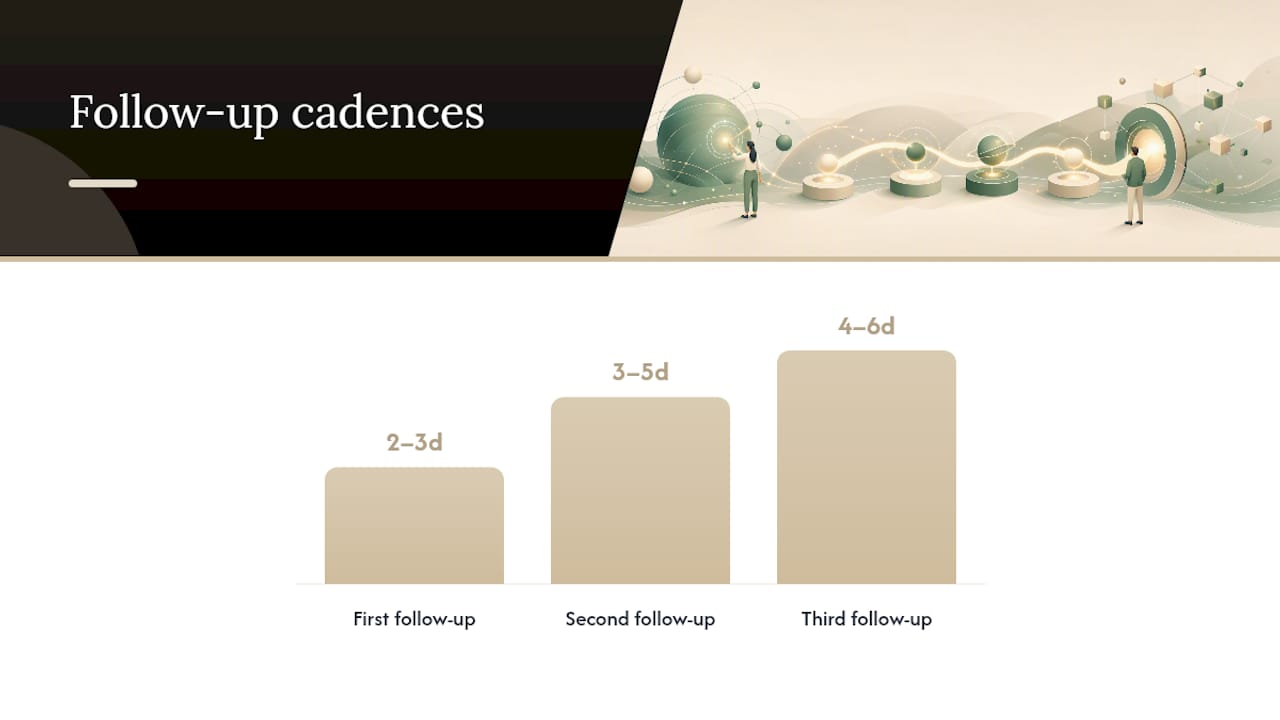
For cold outreach and sales sequences, three emails is the number that shows up again and again in performance data. Hunter’s analysis of follow-up templates found that three-email sequences produced a 6.8% reply rate compared with 3.3% for single sends, roughly double. That’s not a case for sending more emails indefinitely. It’s a case for sending exactly three, spaced three to five days apart, then stopping.
- First follow-up: 2 to 3 business days after the original message.
- Second follow-up: 3 to 5 days after the first, with new information or a different angle.
- Third and final: 4 to 6 days after the second, framed as a close-the-loop message rather than another ask.
Adjust the calendar around holidays and busy stretches. Add three to five days to every window in the two weeks around major holidays, and if you’re emailing across time zones, send during the recipient’s morning rather than yours to land at the top of their inbox instead of buried under a day’s accumulation.
The stopping rule is simple: after your third attempt with no response, send one final message that closes the loop instead of asking again. Something like, “I’ll assume the timing isn’t right and won’t follow up further, but the door’s open whenever it makes sense.” That single sentence does more for your reputation than a fourth chase ever would.
Subject Lines That Get Opened: Formulas and Examples
The single highest-leverage subject-line move is referencing the original thread. Keeping “Re:” in front of your subject, or echoing the exact phrase from the first email, preserves context and signals continuity, which Web Tonic’s research on follow-up emails ties directly to better open rates than a fresh, generic subject.
Vague phrases underperform consistently. “Just following up” or “Checking in” tell the recipient nothing and often get skipped in a crowded inbox, a pattern confirmed in ToneLang’s subject-line data. Specificity wins. Reference a date, a project name, or a concrete detail instead.
Here are twelve subject lines you can adapt across scenarios:
- Re: Proposal for [Project Name] — quick question
- Following up: [Date] call about [Topic]
- One detail before we finalize [Project]
- [Company Name] onboarding: next step
- Re: Interview for [Role] — thank you
- Quick nudge on the invoice from [Date]
- New info on [Topic] since we last spoke
- Circling back on [Project] before Friday
- Re: [Original Subject] — any update?
- [First Name], following up on our chat at [Event]
- Final note on [Project] — closing the loop
- Invoice #[Number]: 15 days past due
Test one variable at a time. Run subject line A against subject line B with the same body copy, and track open rate specifically, not reply rate, since the subject line’s only job is getting the email opened. Once you find a formula that consistently outperforms, lock it in for that scenario and move on to testing the CTA instead.
Pro Tip: Keep subject lines under 50 characters. Most email clients truncate longer ones on mobile, which cuts off the exact detail you added to make it specific.
A quick note on specificity versus clutter: adding a project tag or ticket number works well for invoice and support follow-ups, where recipients are scanning for a reference number. It works poorly for relationship-driven outreach like networking or sales, where a tag makes the message feel automated before it’s even opened.
12 Copy-Paste Follow-Up Templates by Scenario
Every template below follows the four-part formula. Treat the bracketed sections as placeholders that need real detail. Templates are a starting structure, and the guidance from Serif on following up is blunt about this: everything in brackets has to be replaced with something specific to the recipient, or the message reads as a form letter and gets treated like one.
1. Same-thread bump (sales, first follow-up)
Subject: Re: [Original Subject]
Hi [Name], wanted to bump this back to the top of your inbox. Quick question: does [specific detail from last conversation] still line up with your timeline? Happy to hop on a 10-minute call this week if that’s easier. Let me know what works.
Use this as your first touch, 2 to 3 days after the original send.
2. New-angle add (sales, second follow-up)
Subject: One more thing on [Project Name]
Hi [Name], following up with something that came up since we last talked: [new resource, case study, or data point]. Thought it might be useful given what you mentioned about [specific pain point]. Worth a quick call to walk through it?
Send this three to five days after the first bump, and only if it genuinely adds something new.
3. Post-demo recap
Subject: Recap from our call + next step
Hi [Name], great connecting today. Recapping the two things we agreed on: [point one] and [point two]. I’ll have [deliverable] over by [date]. In the meantime, does [specific next step] work for your team?
Send this within 24 hours of the demo, while details are still fresh for both sides.
4. Proposal chase
Subject: Re: Proposal for [Project Name]
Hi [Name], checking in on the proposal I sent over on [date]. I know budget review can take a bit, so no rush, but wanted to flag that [specific incentive, deadline, or capacity note]. Would a quick call this week help move things along?
Send three to five business days after the proposal, matching the standard sales follow-up window.
5. Interview thank-you
Subject: Re: Interview for [Role] — thank you
Hi [Name], thank you for the conversation today about the [Role] position. I especially enjoyed discussing [specific topic from the interview]. It reinforced how well my background in [relevant skill] fits what your team needs. Looking forward to hearing about next steps.
Send within 24 hours, before the interviewer moves to the next candidate.
6. Interview no-response follow-up
Subject: Checking in on [Role] — [Company]
Hi [Name], hope the hiring process is going well on your end. Wanted to check in on the status of the [Role] position, since our conversation on [date]. Happy to provide anything else that would help the decision.
Send this one week after the interview if you haven’t heard back, and only once before moving to a close-the-loop message.
7. Networking nudge
Subject: Great meeting you at [Event]
Hi [Name], enjoyed our conversation at [Event] about [specific topic]. You mentioned [specific detail], and I wanted to follow up with [resource, introduction, or idea] that connects to it. Would love to stay in touch, maybe grab a virtual coffee sometime in the next few weeks?
Send within three days of meeting someone, while the context is still specific in both your memories.
8. Invoice reminder, friendly
Subject: Invoice #[Number] — friendly reminder
Hi [Name], hope things are going well. Just a quick note that invoice #[Number] for [Amount] was due on [Date]. Let me know if you need a copy resent or if there’s a hold-up I should know about.
Send this one day after the due date, NET30+1, keeping the tone entirely neutral.
9. Invoice reminder, firm
Subject: Invoice #[Number] now 15 days past due
Hi [Name], invoice #[Number] for [Amount] is now 15 days past the due date of [Date]. Please process payment by [new date] to keep the account in good standing. Let me know if there’s an issue on your end I can help resolve.
Send around day 15 to 20 past due if the friendly reminder got no response.
10. Invoice reminder, legal-tone
Subject: Final notice: Invoice #[Number]
Hi [Name], this is a final notice regarding invoice #[Number] for [Amount], now [X] days past due. If payment isn’t received by [date], this account will move to [next step, e.g., collections or late fees per contract terms]. Please contact us directly to resolve this before then.
Reserve this for 30+ days past due, and only after two prior reminders went unanswered.
11. Final-touch close (any scenario)
Subject: Re: [Original Subject] — closing the loop
Hi [Name], haven’t heard back, so I’ll assume the timing isn’t right on this one. No hard feelings, and I won’t keep following up. If anything changes on your end, my door’s open, just reach out.
Send this as your third and final attempt in any sequence, sales or otherwise.
12. Reactivation after a long gap
Subject: Circling back after a while
Hi [Name], it’s been a few months since we last talked about [topic], and wanted to check whether [specific detail] is still relevant on your end. Things may have changed, but happy to reconnect if the timing works now.
Use this for contacts gone cold for more than six weeks, where a full re-introduction makes more sense than resuming an old thread.
If a template didn’t work the first time, change one variable before resending: swap the CTA from a question to a specific time slot, or replace the value-add with a different resource. Sending the identical message twice reads as carelessness, not persistence.
Follow-Up Mistakes That Kill Reply Rates (and Quick Fixes)
Five mistakes account for most follow-ups that never get a response, and every one of them is fixable in under a minute.
Vague subject lines. “Checking in” and “Following up” tell the reader nothing about why this email matters right now. Fix: name the specific topic, project, or date.
Repeating the original message word for word. This signals you didn’t add anything new, which makes the second email feel like noise. Fix: always include one new detail, resource, or update.
Overly apologetic tone. “Sorry to bother you again” undercuts your own message before the reader gets to the ask. Fix: state your point plainly and skip the apology.
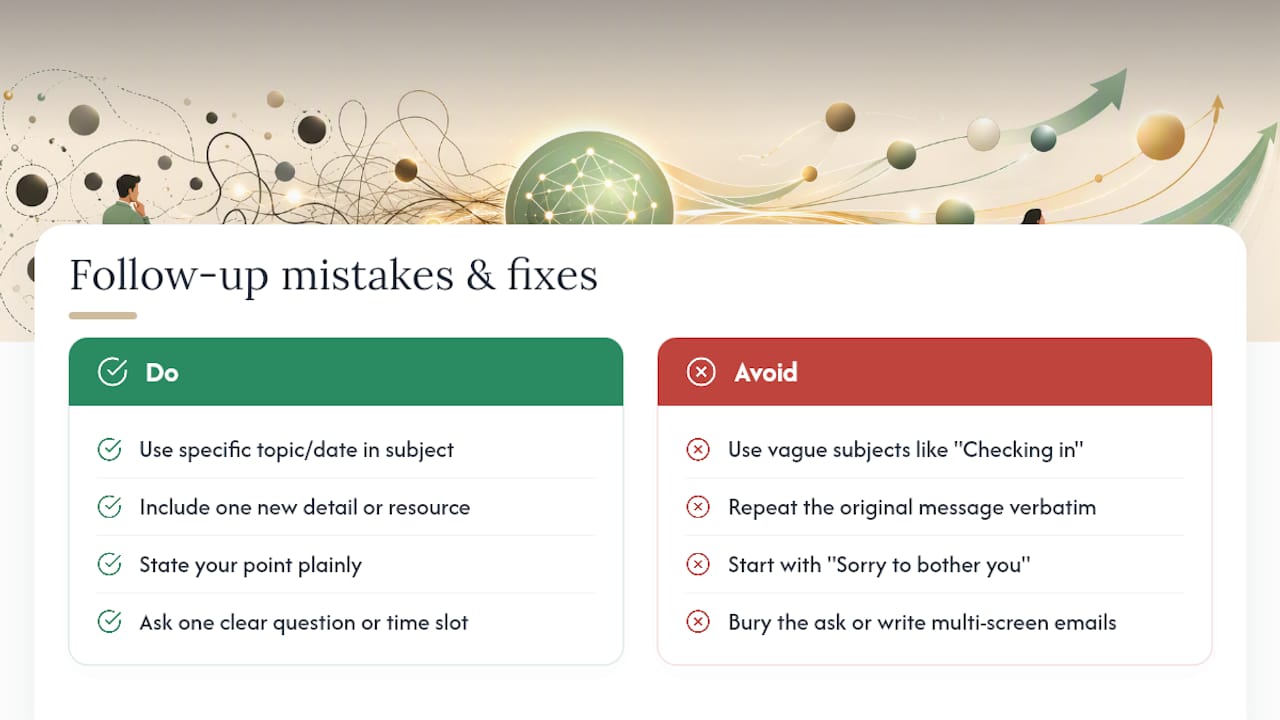
Burying the CTA. A follow-up with three different asks buried in the middle of a paragraph gets skimmed and ignored. Fix: put one clear ask at the end, ideally as its own short line.
Writing too long. A follow-up that takes two screens to read asks for more time than most recipients will give it. Fix: cut to three to six sentences and move any extra detail to an attachment.
The fastest way to raise your reply rate isn’t a clever new template. It’s making replying take one stroke, one click, one word, one tap, instead of a paragraph of typing. Every sentence you add past the fourth is a sentence the recipient has to process before deciding whether to bother responding at all.
Two heuristics cover almost every fix above. First, make replying one stroke: a yes/no question or a single time slot beats an open-ended “let me know your thoughts.” Second, always add new value or an easy out: give the reader a reason to reply now, or give them permission to say no gracefully. Both keep the exchange moving instead of stalling in someone’s inbox.
Measuring Follow-Up Performance and Choosing the Right Tools
Four numbers tell you whether your follow-up sequence is working: reply rate (percentage who respond at all), meeting-book rate (percentage who take the next step you asked for), open rate (percentage who open the email, which isolates subject-line performance), and time-to-reply (how long it takes to get a response, which flags whether your CTA is easy enough to act on quickly).
Testing one variable at a time keeps the data clean. Run the same body copy against two subject lines to isolate open rate, or the same subject against two different CTAs to isolate reply rate. Hunter’s performance data on follow-up templates backs this approach: small, single-variable tests on subject lines and calls-to-action are what move the needle over a full sequence, not a wholesale rewrite every time a message underperforms.
Before picking a tool, check for four things:
- Inbox integration that keeps threads intact instead of creating disconnected new emails.
- Calendar-aware scheduling so follow-ups don’t land at 2am the recipient’s time.
- Personalization variables that pull in real details, not just first name and company.
- Basic analytics on open rate and reply rate per template, so you can see what’s actually working.
Automate the sequence for high-volume, lower-touch scenarios such as invoice reminders or cold outreach where consistency matters more than nuance, following a comprehensive marketing automation checklist to optimize workflows. Hand-write follow-ups for relationship-driven contacts, meaning anyone you’d feel awkward sending a templated message to, like a hiring manager, an investor, or a client you’ve worked with for years. The line isn’t about volume; it’s about how much the relationship would suffer if the message felt automated.
How Otto Turns Follow-Up Templates Into Closed Loops
Templates solve the writing problem. They don’t solve the remembering problem, which is the harder one. Most missed follow-ups aren’t missing because nobody wrote a good template. They’re missing because the promise made on a call three days ago never made it onto anyone’s list.
Otto works from one shared memory across email, calendar, and meetings, so a commitment made out loud in a call shows up next to the email thread it belongs to. Nothing has to be manually copied from a meeting notes app into a task list into an email draft.
A typical workflow looks like this:
- Capture: Otto hears “I’ll send the proposal by Thursday” in a meeting and logs it against that contact.
- Draft: When Thursday approaches, Otto drafts the follow-up using the four-part formula, pulling in what was actually discussed.
- Approve: You review the draft. Nothing sends without your explicit sign-off.
- Send and track: Once approved, Otto sends it and keeps the commitment open until the recipient replies or the loop closes.
| Benefit | What it solves |
|---|---|
| Fewer missed follow-ups | Commitments made verbally get tracked the same as ones made in writing |
| Consistent personalization | Drafts pull real meeting context instead of generic placeholders |
| Persistent reminders | Otto keeps an item open until it’s actually closed, not just sent |
When to Stop Chasing and Preserve the Relationship
Here’s a rule I keep coming back to: multiply the value of the outcome by the strength of the relationship before deciding how hard to chase. A high-value deal with a warm relationship earns four or five touches. A cold lead with no prior connection rarely earns more than three.
A graceful close, the kind that says “the door’s open, no pressure,” costs you nothing and often gets a reply months later when timing changes. Persistence past that point reads as pressure, and pressure is what makes people block your domain instead of replying.
— Eddie
Otto: An Honest Alternative for Automating Follow-Up Workflows
Templates fix what you say. Otto fixes what you forget. The gap most professionals hit isn’t a lack of good copy, it’s that a promise made on a call at 3pm never makes it into the follow-up sent at 5pm, because nobody wrote it down in a place connected to your inbox.

An AI assistant that unifies email, calendar, and meetings can capture commitments as soon as they’re made and track them until closed. It drafts follow-ups using a structured format including reference, restated ask, new value, and a single CTA, and waits for your approval before sending anything. Professionals juggling multiple open threads tend to feel this gap hardest, as they often manage many connections mentally. If a stalled proposal or an unanswered interview thank-you has slipped through before, see how Otto’s AI chief of staff handles the tracking so you don’t have to.